Skip to content

Store and growth

Built-in SEO: meta tags, schema markup, sitemaps and redirects

DJIA Builder writes the SEO head of every page from your content and settings: title, description, canonical and robots tags, Open Graph and X cards, and schema markup as JSON-LD. It also serves XML sitemaps and robots.txt and keeps a redirect manager.

Pages that WordPress renders get the same head through the DJIA Theme, unless Yoast SEO or Rank Math is active.

  • One JSON-LD graph per page
  • Sitemaps with images, up to 2,000 URLs per file
  • Automatic 301 when a URL changes
Product data to head and JSON-LDPlaceholder data
One product page: the title becomes the title tag and og:title, the short description becomes the meta description and the featured image becomes og:image. The price and the rating become the Offer and AggregateRating nodes of Product, and the category becomes the BreadcrumbList. WebSite, WebPage and Product are linked by @id in one graph. A version of the product list sorted by price gets noindex, follow and a canonical that points to the main list, which stays index, follow.

What every page head gets

  • Title and meta description, from patterns or from the page's own fields.
  • A canonical URL on every indexable page, including page 2 and later of an archive.
  • Robots meta, index, follow with large image previews unless a rule or your setting says otherwise.
  • Open Graph and X cards with their own title, description and image, falling back to the featured image.
  • Verification tags for Google, Bing, Yandex and Pinterest.

Page address/shop/everyday-backpack//shop/backpacks//journal/how-to-pack-a-daypack//shop/backpacks/?orderby=price

Page head · example
<title>Everyday Backpack | Example Shop</title>
<title>Backpacks | Example Shop</title>
<title>How to pack a daypack | Example Shop</title>
<meta name="description" content="A light daypack for the commute.">
<meta name="description" content="Used cars for the city and the highway.">
<meta name="description" content="Five things to check before you buy a used car.">
<link rel="canonical" href="https://example.com/shop/everyday-backpack/">
<link rel="canonical" href="https://example.com/shop/backpacks/">
<link rel="canonical" href="https://example.com/journal/how-to-pack-a-daypack/">
<meta name="robots" content="index, follow, max-image-preview:large…">
<meta name="robots" content="noindex, follow">
<meta property="og:title" content="Everyday Backpack | Example Shop">
<meta property="og:title" content="Backpacks | Example Shop">
<meta property="og:title" content="How to pack a daypack | Example Shop">
<meta property="og:image" content="https://example.com/backpack.jpg">
<meta property="og:image" content="https://example.com/daypack.jpg">
<meta name="twitter:title" content="Everyday Backpack | Example Shop">
<meta name="twitter:title" content="Backpacks | Example Shop">
<meta name="twitter:title" content="How to pack a daypack | Example Shop">
<meta name="google-site-verification" content="your-code">

Example only, with placeholder data.

Example content

EXAMPLE.COM

Everyday Backpack | Example ShopBackpacks | Example ShopHow to pack a daypack | Example Shop

A light daypack for the commute.Used cars for the city and the highway.Five things to check before you buy a used car.

Social card · example (Open Graph and X)
JSON-LD · example
{"@context": "https://schema.org",
"@graph": [
{"@type": "WebSite", "@id": "…/#website"},
{"@type": "WebPage", "@id": "…/#webpage",
"isPartOf": {"@id": "…/#website"}},
{"@type": "CollectionPage", "@id": "…/#webpage",
"isPartOf": {"@id": "…/#website"}},
{"@type": "BreadcrumbList", "@id": "…/#breadcrumb"},
{"@type": "BreadcrumbList", "@id": "…/#breadcrumb"}
{"@type": "Product", "@id": "…/#product", "name": "Everyday Backpack",
"offers": {"@type": "Offer", "price": "79.00"}}
{"@type": "BlogPosting", "@id": "…/#article", "headline": "How to pack a daypack",
"author": {"@type": "Person", "name": "Alex Morgan"}}
]}

Patterns and per-page fields

Set title and description patterns per post type, taxonomy and archive, such as {title} {sep} {site}. Tokens cover the excerpt, term, author, date, page number, search term and current year.

Override any post, page or product in the DJIA SEO box on its edit screen. It holds the SEO title, meta description, focus keyphrase, canonical URL, robots, social title, description and image, breadcrumb title, primary category and sitemap exclusion. An empty description uses the excerpt, cut at a word boundary.
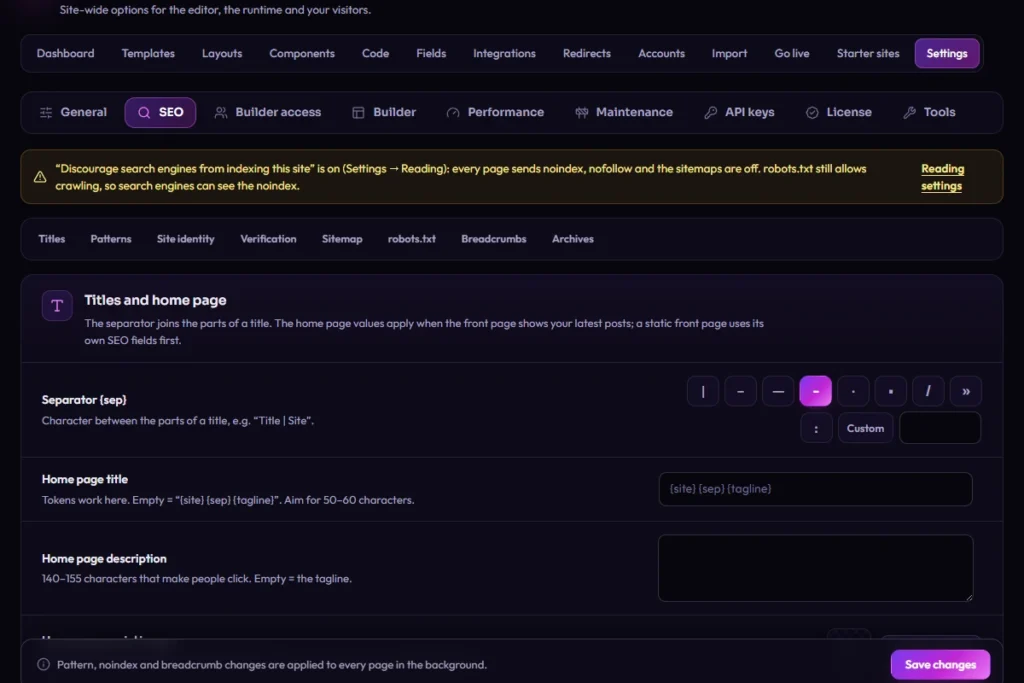
DJIA SEO box and Settings → SEO
DJIA Builder Settings, SEO
Settings → SEO.

Schema markup from your content

Each page gets one connected JSON-LD graph, built from the same data as the page.
  • Site and page: WebSite and WebPage, with CollectionPage for archives, ProfilePage for authors and SearchResultsPage for search.
  • Who is behind the site: Organization, Person or LocalBusiness, with more than 50 business subtypes, plus address, opening hours and logo.
  • Content: BlogPosting with its author for posts, BreadcrumbList and the primary image.
  • Products: Product, or ProductGroup with one offer per variation, with ratings and reviews from WooCommerce. Return policy and shipping details can be added to every offer.
Validator result – demo product page
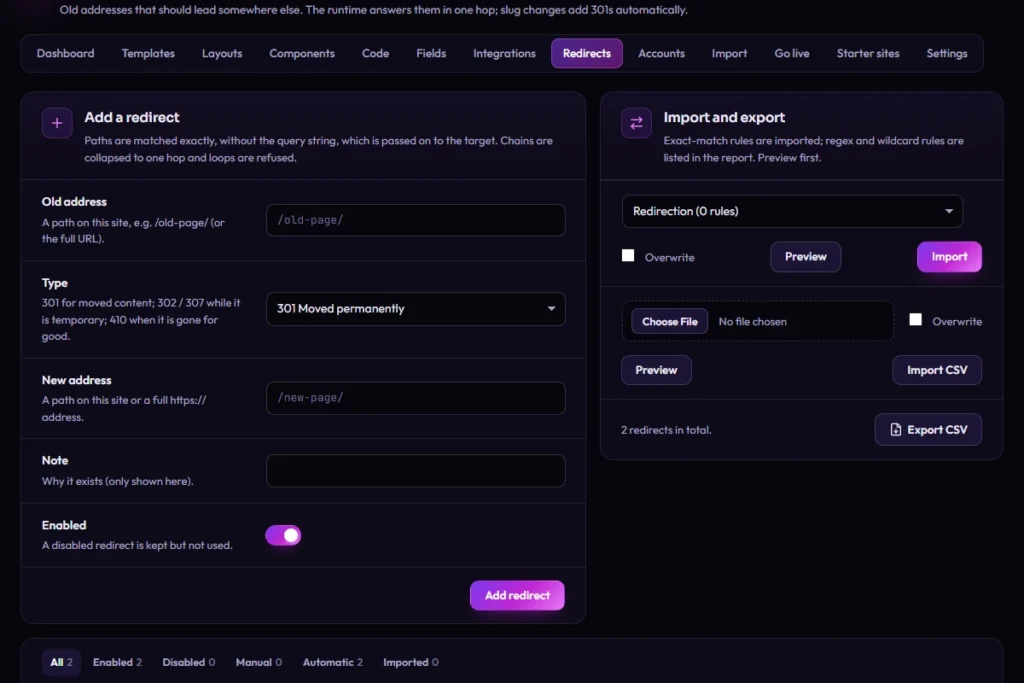
DJIA Builder Redirects
DJIA Builder → Redirects.

To confirm Take the capture only after checking the demo page; claim neither "valid" nor rich results before.

XML sitemaps and robots.txt

  • A sitemap index at /sitemap.xml, up to 2,000 URLs per file, with last-modified dates, images and a stylesheet that makes it readable in a browser.

  • You choose what's in it. Exclude post types, taxonomies or single pages; author sitemaps are off by default. Filter landing pages you publish get their own file.

  • Old addresses keep working. Sitemap URLs used by Yoast SEO, Rank Math and WordPress redirect to the new files, and WordPress's own sitemaps are off while yours is on.

  • robots.txt keeps /wp-admin/ out, adds the sitemap line and takes your own rules, but drops any rule that would hide CSS, JavaScript or images from all crawlers. One switch blocks AI training crawlers such as GPTBot and Google-Extended, while search and citation crawlers stay allowed.

On multilingual sites, each URL lists its language versions with hreflang. Multilingual plugins are in testing; see the integration status page.

Indexing rules already in place

  • Search results and 404 pages are noindex, follow.
  • Date archives are noindex by default; author archives are indexed unless you change it.
  • Empty category and tag pages are noindex, and you can raise that threshold.
  • Sorted and per-page versions of a product list are noindex, follow, with the canonical pointing to the main list. Filtered versions are treated the same way, except filter landing pages you choose, which get their own title, description and canonical.
  • Password-protected pages are noindex, and their head reveals nothing of the content.
  • With "Discourage search engines" on, every page sends noindex, nofollow.

Redirects that keep up with your URLs

The redirect manager handles 301, 302, 307 and 308 redirects, and 410 and 451 responses. When a published post, page, product or term gets a new URL, DJIA Builder adds a 301 from the old one. When published content is deleted permanently, its old URL returns 410.

Chains are collapsed to one hop and loops are refused. Redirects can be imported and exported as CSV, managed with WP-CLI (wp djb redirect), and they still work when a missing URL reaches WordPress instead of the runtime.

DJIA Builder 1.0.18.5 – RedirectsPlaceholder
Screenshot F11-3 · real capture goes here
Planned capture: the redirect manager with the columns source, target, code and origin (Manual, Automatic, CSV import). Test data only.

Moving from Yoast SEO or Rank Math

Import titles, descriptions, focus keyphrases, canonical and robots values, social fields, primary categories, title patterns, breadcrumb settings, site identity and verification codes. Redirects come from Yoast SEO Premium, Rank Math or the Redirection plugin; only exact-URL rules are imported, and the report lists what was skipped.

  • Preview first. A dry run reports what would change without saving anything.

  • Safe to repeat. Values you already set in DJIA Builder stay unless you choose to overwrite them.

  • Compare before switching off. A CSV report puts the plugin's title, description, canonical and robots next to DJIA Builder's for every indexable URL, with a match flag per field.

Pages served by the runtime always use DJIA Builder's SEO. While Yoast SEO or Rank Math stays active, it controls the head of pages WordPress renders, so running both is not recommended after the import.

Yoast SEO, Rank Math and Redirection are trademarks of their owners. DJIA Builder imports their data; it has no live connection to them.

SEO import status

Good to know

Good to know
  • There is no content score or readability check. The focus keyphrase is stored and imported, not analyzed.
  • Category and tag edit screens have no DJIA SEO box. Their titles and descriptions come from the taxonomy pattern, the term description or an import.
  • Product markup needs WooCommerce. Return policy and shipping details stay off until you turn them on in Settings → SEO.
  • In a subfolder install, robots.txt stays with WordPress.

See DJIA Builder on your own site

Run the import as a dry run, compare the report with what you have today, and switch off the old plugin when the values match.

Page source · excerpt, placeholder data
<title>Everyday Backpack | Example Shop</title>
<link rel="canonical"
href="https://example.com/shop/everyday-backpack/">
<script type="application/ld+json">
{"@context": "https://schema.org",
"@graph": [
{"@type": "WebSite", "@id": "…/#website"},
{"@type": "WebPage", "@id": "…/#webpage",
"isPartOf": {"@id": "…/#website"}},
{"@type": "Product", "@id": "…/#product",
"offers": {"@type": "Offer", "price": "79.00"}}
]}
</script>